

Hey friends, Happy Wednesday!
Databricks, Snowflake, and Microsoft Fabric.
Once you enter the data world, you hear these three names everywhere. Job posts. LinkedIn. Meetings. And if you are new, I totally understand that this topic is confusing.
What are these platforms? What is the difference between them? And which one should I learn?
Let’s go.
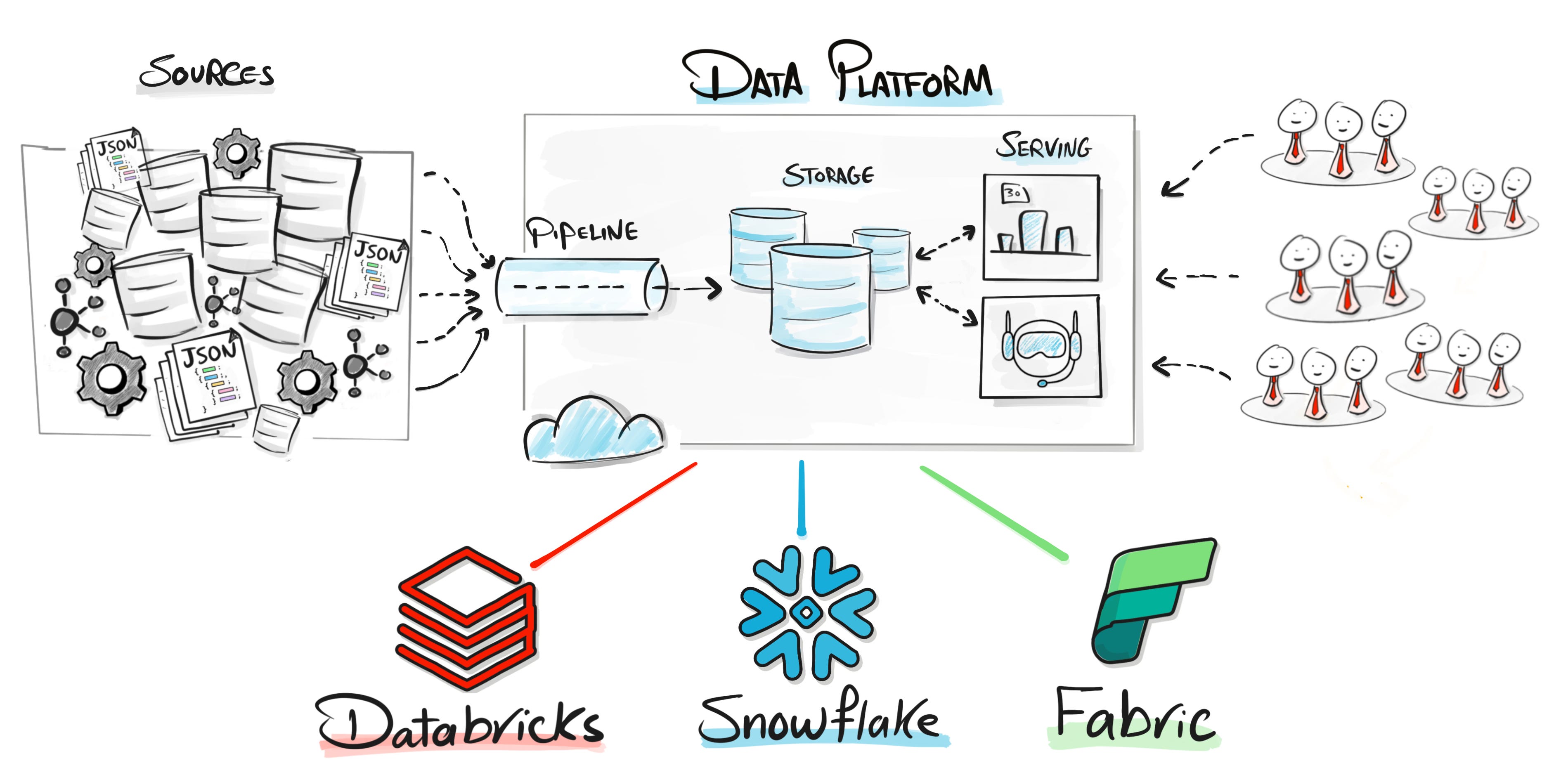
What is a data platform?
One central place where the whole data work happens:
Store the data in the cloud
Clean and transform it with pipelines
Analyze it with reports, dashboards, and AI
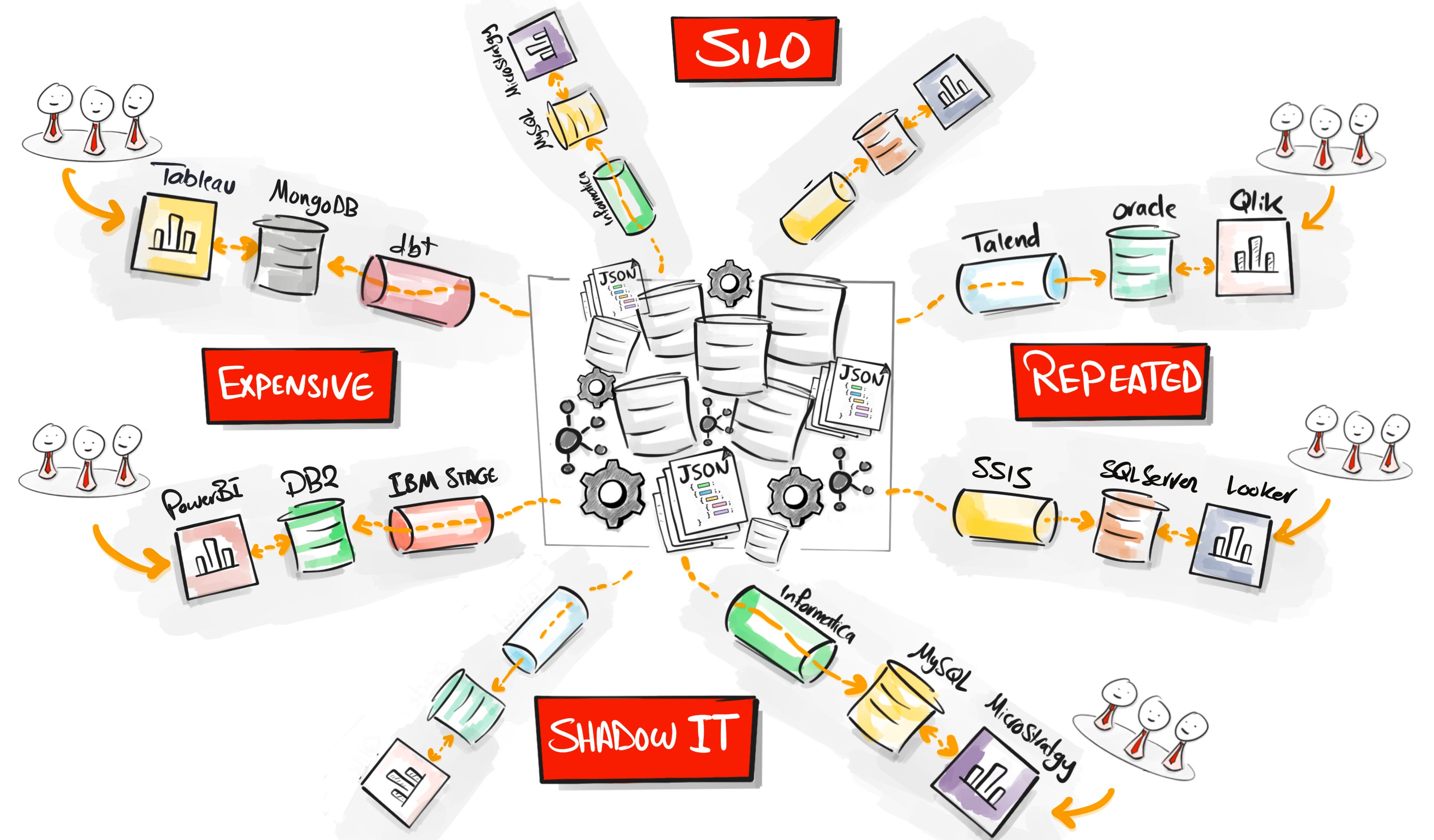
Why companies pay for this? Because the alternative is chaos. Without one platform, every team buys its own tools. One for ETL, one for the database, one for orchestration, one for reporting. And good luck connecting all of that in one project. I have done exactly this more than seven times in different companies, and I can tell you, it was a nightmare. Data silos, repeated projects, shadow IT, and a very expensive way to work with data.
So this is the promise of all three: everyone in one place, one copy of the data, one source of truth.
The origins explain everything
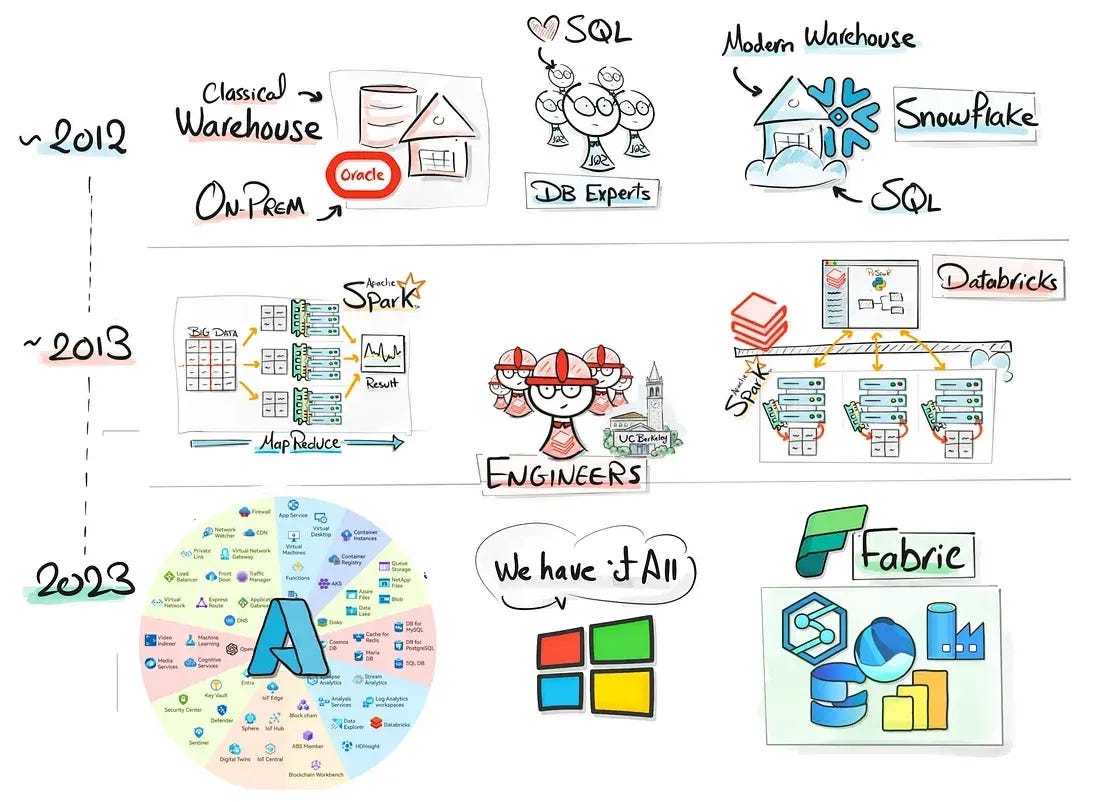
Snowflake (2012): database engineers from
Oracle. People who love SQL and clean warehouses. So they rebuilt the data warehouse for the cloud. Simple, managed, SQL-first.
Databricks (2013): the Berkeley researchers who created Apache Spark. People who love code and big data. A platform built by engineers, for engineers.
Microsoft Fabric (end of 2023): the youngest one. Microsoft glued Power BI, Data Factory, and Synapse into one bundle, for companies that already live in the Microsoft world.
And nobody here is small. Databricks is around $7 billion a year, growing around 80%. Snowflake is over $5 billion, growing around 30%. Fabric passed $2 billion, growing around 60%. One more detail people miss: Snowflake and Databricks are independent companies. Fabric is not a company. It is a product from Microsoft.
Keep this in your head: Snowflake is the SQL people. Databricks is the engineering people. Fabric is the Microsoft world.
The differences
1. The cloud
Where the platform is allowed to run.
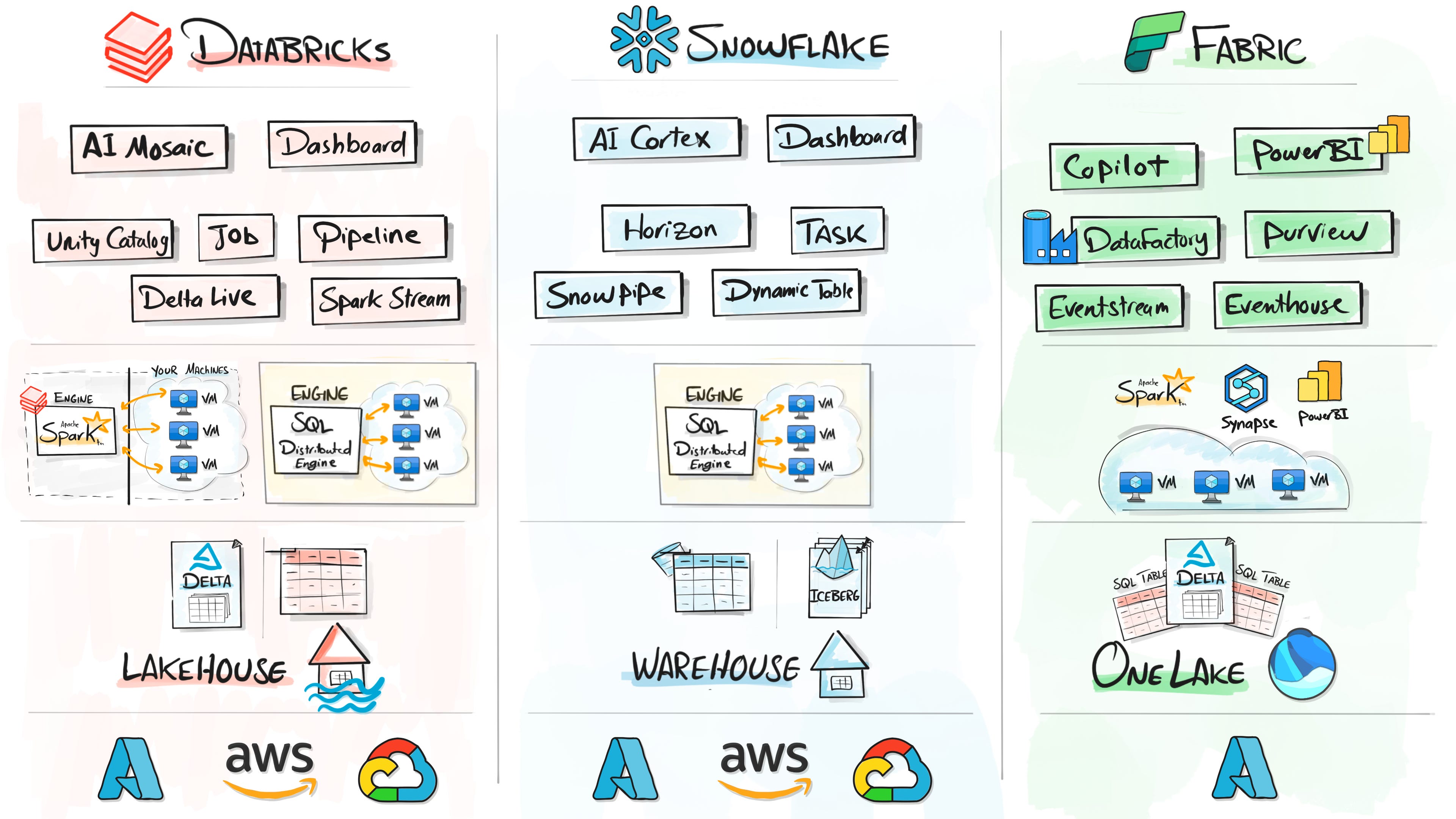
Databricks: any cloud. Azure, AWS, or Google.
Snowflake: any cloud too. You pick one when you create the account.
Fabric: Azure only.
2. The storage
Where your data lives, and whether you can see the files.
Databricks: real files in your own storage, in the open Delta format, and any tool can read them. On top of the files you still get tables and SQL. That is the lakehouse.
Snowflake: everything in Snowflake’s storage, in its own closed format. You see tables, never files. The classic warehouse. But they adapted: Iceberg, the other open format, is now supported too.
Fabric: the whole company in OneLake, like OneDrive but for data. And the files inside are Delta, the exact format Databricks created.
The pattern: everyone starts their own way, then adopts what works from the competitors.
3. The compute
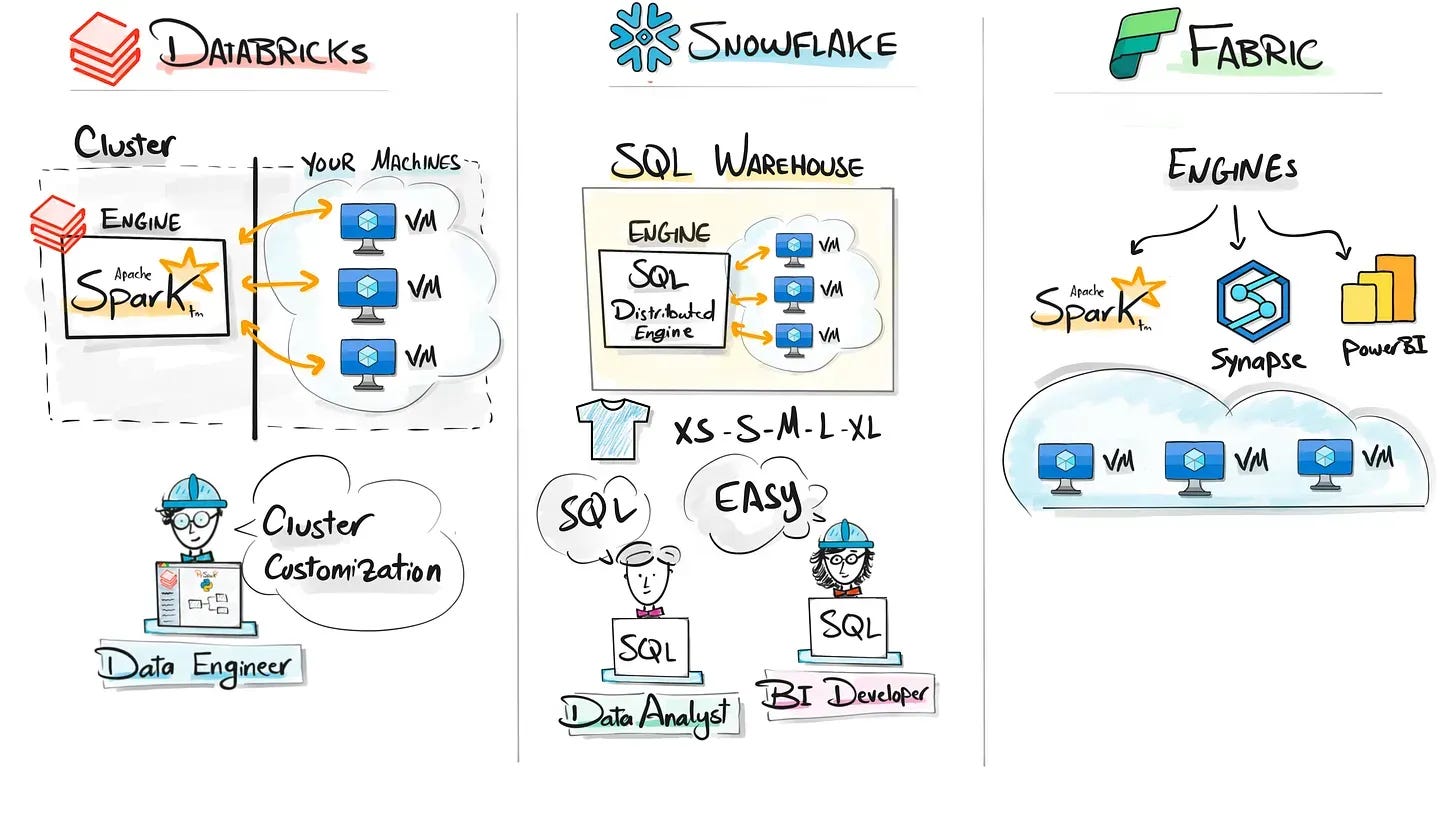
All three split your
work across many machines in the cloud. The real question: who manages those machines?
Databricks: the Spark engine, two ways to run it. Classic: machines in your own cloud account, you configure the clusters yourself (PaaS). Serverless: Databricks machines, few clicks, fully managed (SaaS). And serverless does not mean no servers. It means not your servers.
Snowflake: their own SQL engine, built just for SQL. You pick a warehouse in t-shirt sizes and you never see a machine. Fully managed (SaaS).
Fabric: not one engine, several: Spark, the Synapse SQL engine, and the Power BI engine, all on Microsoft machines. The most SaaS of the three.
4. The bill
How each one charges you
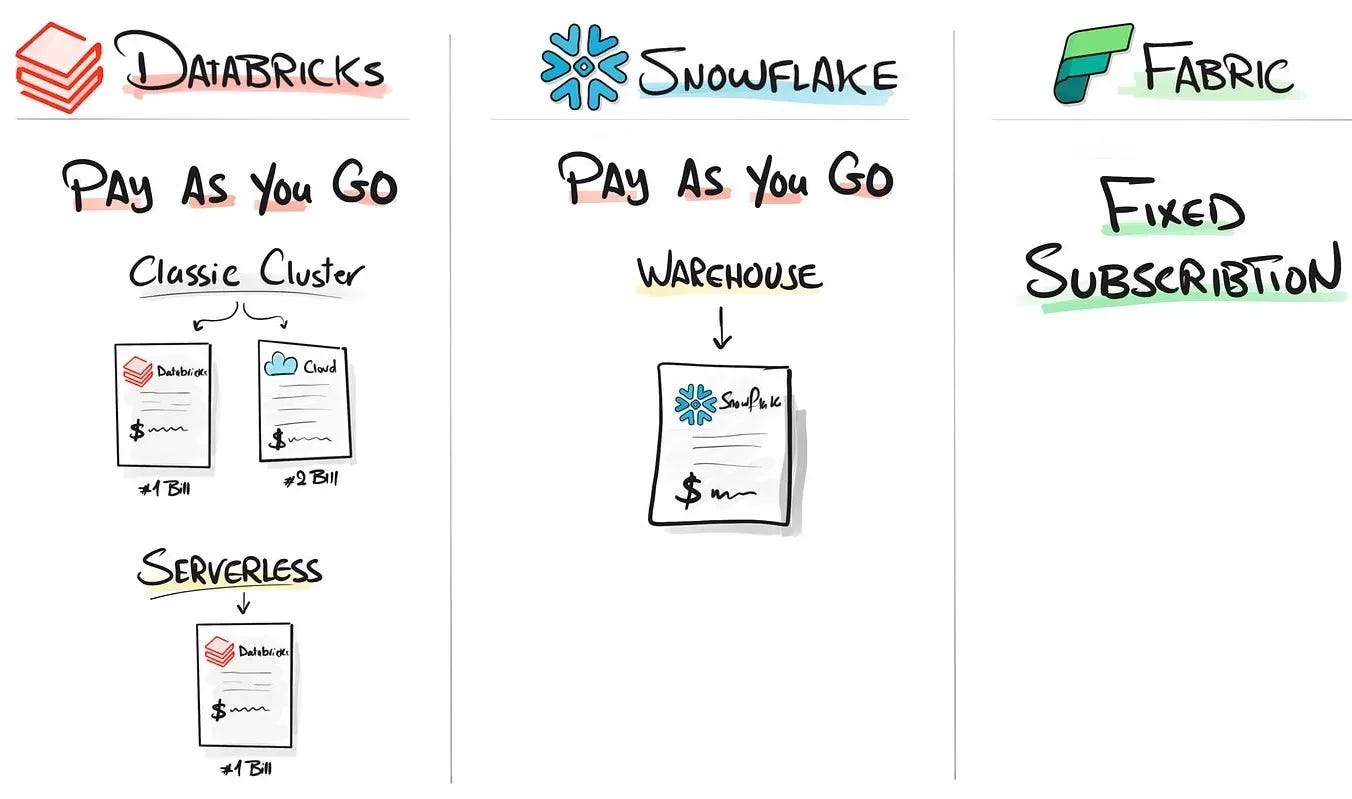
Databricks: pay as you go. On the
classic cluster you get two bills, one from Databricks and one from your cloud for the machines. On serverless, one bill for everything.
Snowflake: pay as you go, same model. You pay while things run. You stop, you stop paying. One bill from Snowflake.
Fabric: a fixed subscription. You buy one capacity, all teams share it, and the price stays the same whether you use it or not.
My opinion, after living with both models:
Pay as you go sounds fair, but it opens the door for surprises. A warehouse running the whole day doing nothing. High-end compute on a tiny task.
And budgeting is the real pain. Estimating the whole year for your managers? Good luck with that.
The fixed model is way more friendly to plan. One price, no surprises.
5. Streaming
Loading live data as it arrives.
Databricks: Spark Streaming and Delta Live Tables. The strongest of the three.
Snowflake: Snowpipe and dynamic tables. A little bit simpler.
Fabric: built-in event streams and the eventhouse.
6. Orchestration
How you schedule and run your pipelines.
Databricks: pipelines and jobs, different ways inside the platform. Second place.
Snowflake: tasks for scheduling. The weakest here, and in practice most teams bring Airflow or dbt from outside anyway.
Fabric: a standalone tool for it, the famous Data Factory. The winner here.
7. Governance
Who can see what data, and where the data actually goes.
Databricks: Unity Catalog, the strongest implementation. It is made for this.
Snowflake: Horizon.
Fabric: Purview.
8. Machine learning and AI
All three added it, and the personalities show again.
Databricks: Mosaic AI. Build and train your own models, even AI agents. The strongest, no brainer.
Snowflake: Cortex. AI directly inside your SQL, you ask your data questions right in the queries.
Fabric: Copilot. The assistant everywhere in the Microsoft world.
9. Dashboards
How the business sees all of this.
Databricks: somex built-in dashboards, but in real projects the business connects Power BI or Tableau on top.
Snowflake: same story. Built-in components, and Power BI or Tableau for the real reporting.
Fabric: the win. Power BI is the core of the family, there is nothing to connect.
Who actually picks each one
Databricks: companies with heavy engineering, big pipelines, streaming, machine learning and AI. But honestly, it is an overkill if you are a data analyst who just wants to work with SQL.
Snowflake: analytics-first companies. Teams that speak SQL and want speed at scale without the engineering deep end.
Fabric: Microsoft shops. One subscription, everything included, and the business already trusts Power BI. The price: you live fully in the Microsoft world.
Okay, which one should YOU learn?
Companies choose by context. You choose by background. But first, my rules, in order:
Foundations first. SQL and Python are the core of everything. Never start a platform before them. And the number one is SQL: as long as we have data, SQL will never die.
Learn one, not three. Learning one platform makes the second one really easy. It is like programming languages, the second language is always faster.
The job asks for a different one? Apply anyway. This happens all the time in tech. Nobody learns everything. Show them you understand the concepts, and the switch is fast.
And now the honest answer, by background:
You come from Power BI? Go Fabric. You expand from a tool into a platform, inside the same world.
You are a SQL person and you do not want to go deep into coding? Go Snowflake. You stay in your world.
You want the engineering deep end, the pipelines, the ML and AI? Go Databricks.
And if you are at zero and you ask me what I would learn today? My heart goes with Databricks, and this one is a little bit personal. If time goes back and I am a student again, I would go with Databricks because of the free account. I can experiment and build a lot of projects without paying as I go. And the second reason: inside one platform, I can move between data analytics, data engineering, AI engineering, and data science without switching tools. Deep in one role, small things left and right. That is exactly what many jobs are asking for today. And of course, the growth: around 80% a year.
So …
The full picture in five lines:
Behind the scenes, all three are the same heart: cloud, distributed engines, SQL and Python.
The personalities never change: the SQL people, the engineering people, the Microsoft world.
The real differences: who manages the machines, who sees the files, and how you pay.
Foundations first. Then ONE platform, picked by your background.
You are choosing your first platform, not your last one. The skills transfer.
Hit reply and tell me which one you are picking, I read everything. And if you are searching for a job right now, I really hope you land one soon.
Also, here are 4 complete roadmap videos if you’re figuring out where to start:
📌 Data Engineering Roadmap
📌 Data Science Roadmap
📌 Data Analyst Roadmap
📌 AI Engineering Roadmap

Hey friends —
Hey, I’m Baraa, a Data Engineer with over 17 years experience, Ex-Mercedes Benz, where I led and built one of the biggest data platforms for analytics and AI.
Now I’m here to share it all through visually explained courses, real-world projects, and the skills that will get you hired. I’ve helped millions of students transform their careers.