

Hey friends - Happy Thursday!
Around 2003 in university, SQL was all theory. Books, long lectures, memorizing syntax. No projects. No datasets. No tools. And of course no AI. It was slow and honestly a bit boring.
Today things are much easier.
If I had to learn SQL again in 2026 and I wanted to do it fast, this is the exact path I would follow. One for data analysts and one for data engineers.
Let’s go.
Why Learn SQL?
Before we go into the roadmap, I want to address the biggest question people ask today: Why do we still need to learn SQL when we have AI?
Yes, AI can write SQL. But it also makes mistakes. If you cannot review the logic, you will deliver bad insights. And bad insights lead to bad decisions.
SQL is still one of the most important skills in the entire data world. Data analysts use it every day. Data engineers depend on it to build pipelines. Data scientists need it to prepare datasets.
And almost every modern data tool today supports SQL because it is the easiest way for people to work with data.
This skill is not going anywhere.
The 2x Golden Rule
Here are two simple rules to keep in mind:
Spend 20 percent of your time watching and 80 percent writing your own queries.
Do not try to memorize syntax. Focus on understanding how the data moves through your query. The logic matters more than the keywords. Syntax is easy to look up.
With the right mindset, SQL becomes simple. Now here is the roadmap.
Data Analyst Roadmap To Learn SQL
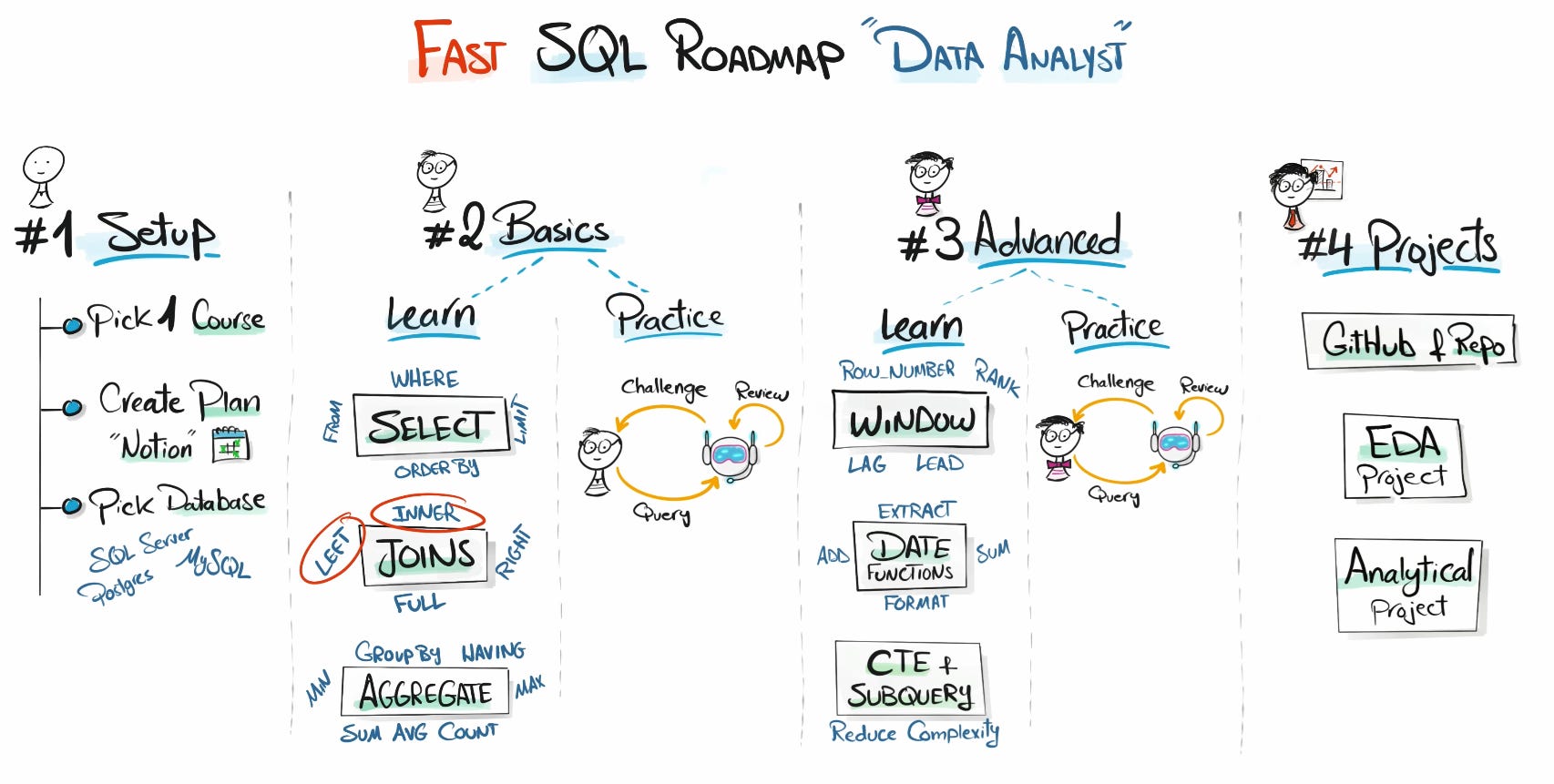
1. Setup
Start with one course and one instructor. Do not mix ten different tutorials.
Pick one database engine. SQL Server or PostgreSQL is perfect.
Create a small plan in Notion so you know what you are doing each week.
Resource: SQL Full 30-Hours mastery
2. Basic SQL Topics
Learn the core building blocks. These will carry you through 80 percent of your work as a data analyst:
SELECT: This is how you pull data from a table and answer any question.
WHERE: Lets you filter rows so you find exactly what you need.
ORDER BY: Helps you sort results to spot patterns.
LIMIT: Useful when you work with large tables and want quick previews.
JOINs: (INNER, LEFT, RIGHT, FULL): Lets you combine tables to get complete insights and focus on INNER and LEFT.
GROUP BY: Groups data so you can calculate metrics.
Aggregations (SUM, AVG, COUNT, MIN, MAX): Turns raw data into meaningful numbers.
Now Close the Course and start practicing, it is between you and ChatGPT!

Prompt:
Act as my SQL mentor and query coach.

My current SQL skills:
- Window Functions
- Date Functions
- CTE
- Subqueries

Your task:

- Give one SQL challenge at a time.
- Start simple and increase difficulty step by step.
- Each challenge must use at least one of the skills above.

For each challenge, include:

1. SQL Task: What I need to find.
2. Sample Data.
3. Keep it short and direct.

Rules when I send my query:

- Review correctness, readability, efficiency, and best practices.
- Suggest clear improvements.
- Give a score out of 10 with a short explanation.
- Then give the next challenge, slightly harder than the previous one.
- If I ask for a hint, give only a small clue, not the full answer.
Tell AI what you’ve learned and ask it for one SQL challenge at a time. Write your own query, get a quick review, then repeat the loop with slightly harder tasks so you improve fast.
3. Advanced SQL Topics
Now you move from basic reporting to real analysis. These topics help you answer harder questions with clean, readable queries:
Window functions: Use things like ROW_NUMBER, RANK, LAG, and LEAD to compare rows, track changes over time, and find top or bottom performers.
Date functions: Helps you extract, format, and group dates so you can answer questions like last week, last month, or previous quarter.
CTEs (WITH): Break big queries into smaller steps so they are easier to read, debug, and explain.
Subqueries: Use a query inside another query when you need a result first, then filter or compare based on it.
Learn these on top of the basics and you can handle most real data analyst work in SQL.
And once you learn these, close the course again and repeat the same practice loop with AI so you build speed and confidence.
4. Build Portfolio Projects
Now it is time to take everything you learned and turn it into real work you can show.
These simple projects will make your SQL skills visible and help you stand out.
Start with an EDA project: Pick one dataset. Clean it, explore it, calculate metrics, and answer a list of business questions using only SQL.
Create one analytical project: Build a second project where you compare trends, find insights, and show how SQL can solve a real problem.
Document everything: Add your queries, notes, and results to GitHub so people can see how you think and how you work.
Keep it simple. Keep it clean. Two strong SQL projects are more than enough for your first portfolio.
And once you finish them, share your progress. It keeps you motivated and helps others learn from your journey.
Data Engineer Roadmap To Learn SQL
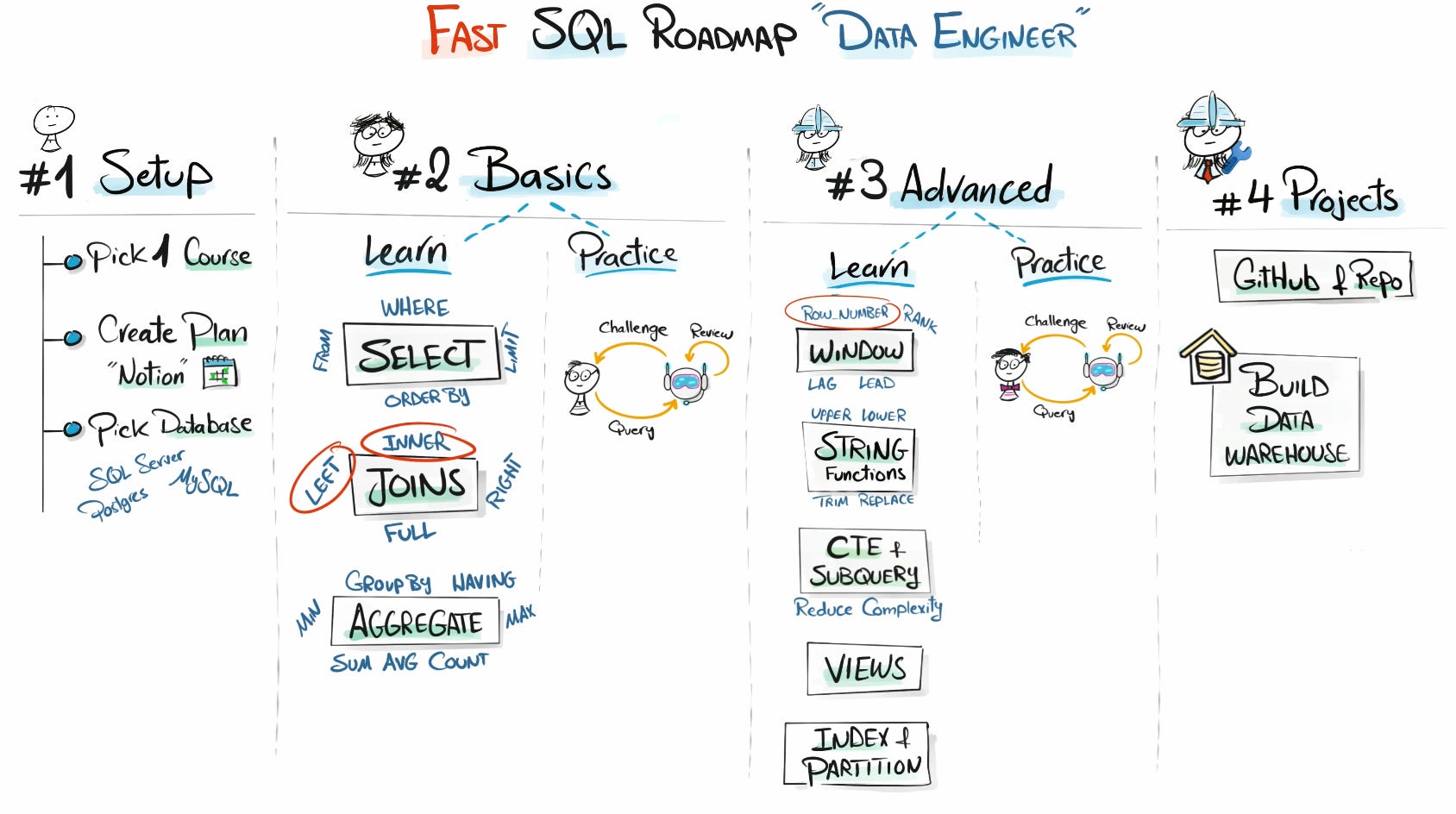
The first two steps are exactly the same as the Data Analyst path.
The advanced topics shift a bit because data engineers work with bigger systems and more complex pipelines:
Window functions help you compare rows, track changes, and prepare data for downstream tasks.
String functions let you clean and reshape messy fields before loading them into your data models.
CTEs and Subqueries help you break down heavy logic into smaller steps so your transformations stay readable.
Views act like reusable building blocks that hide complexity and make pipelines easier to maintain.
Indexing and Partitioning help you speed up queries and handle large tables without slowing the system down.
And once you learn these topics, practice the same way.
Ask AI for one challenge, write your own query, get feedback, then move to a slightly harder task.
For your final project, build a small data warehouse using SQL.
Create a few dimension tables, one fact table, load simple data, and write queries that show how everything connects.
It does not need to be huge, it just needs to show that you understand how data flows inside a real system.
So my Friends…
So my friends, that’s the full picture. If you follow this path, you’ll learn SQL way faster than the old days of books and lectures. It’s simple, it works, and it gets you ready for real projects.
Thanks for reading.
Baraa
Thanks for reading. ❤️
Baraa
Also, here are 4 complete roadmap videos if you’re figuring out where to start:
📌 Data Engineering Roadmap
📌 Data Science Roadmap
📌 Data Analyst Roadmap
📌 AI Engineering Roadmap

Hey friends —
I’m Baraa. I’m an IT professional and YouTuber.
My mission is to share the knowledge I’ve gained over the years and to make working with data easier, fun, and accessible to everyone through courses that are free, simple, and easy!
Brilliant. But AI will get good at SQL reivew, too!
SQL always fascinated me. After this post I feel more motivated and can’t find a reason not to started learning it.
Do you have any recommendations for website/software to start with it (mysql, dbfiddle…)?